Prerequisites for Mac
You must have the following setup on your PC:
- Podman
- Minikube
- Git
This requires a minimum of:
- 2 physical CPU cores
- 6 GB of free memory
For the MeshNetwork (Istio) Lab you need a minimum of:
- 4 physical CPU cores
- 9 GB of free memory
🚀 TASK: Install prerequisites on Mac
Install Homebrew
Follow the instructions 🌏 here to install Homebrew on your Mac.
- 🌏 Detailed Documentation for the Task
Install CLI Tools
brew install kubernetes-cli - 🌏 Detailed Documentation for the Task
Install Podman and Podman Desktop
Download the App and install manually or
brew install --cask podman-desktop Start Podman from the command line
export CONTAINERS_MACHINE_PROVIDER=applehvpodman machine init --cpus 4 --memory 6666podman machine start
<InlineNotification kind="warning">If you get errors regarding 'krunkit' binary, make sure that you select the Apple Hypervisor as runtime.</InlineNotification>
Start Podman from the Podman Desktop
- Open Podman Desktop
- Go to Settings
- Click Create New under Podman
- Make sure you select
Apple Hypervisorunder Provider type - Hit Create
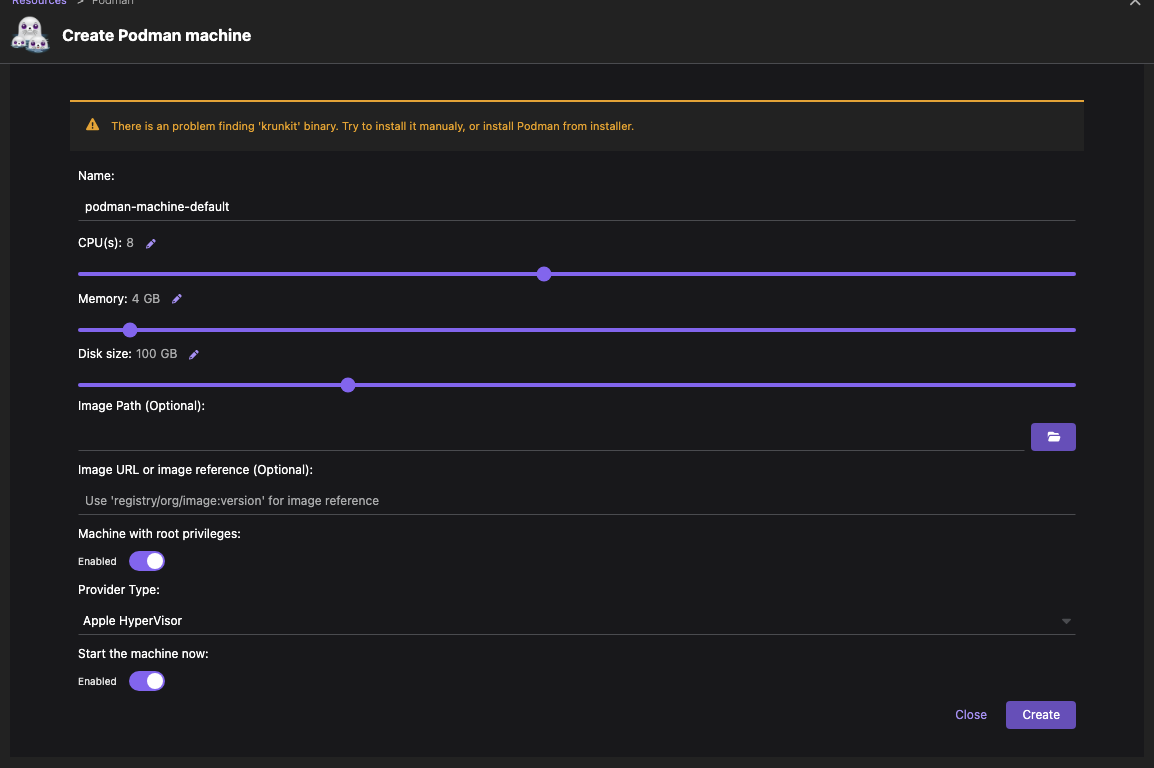
- 🌏 Detailed Documentation for the Task
Install Minikube
Install Minikube
brew install minikubeStart Minikube
minikube start --driver=podman --container-runtime=containerd
or use the Podman Desktop.
Install some addons we will need later
minikube addons enable registryminikube addons enable ingressminikube addons enable dashboardminikube addons list|grep enabled| dashboard | minikube | enabled ✅ | Kubernetes || default-storageclass | minikube | enabled ✅ | Kubernetes || ingress | minikube | enabled ✅ | Kubernetes || registry | minikube | enabled ✅ | Google || storage-provisioner | minikube | enabled ✅ | Google |